前言
在使用flask框架开发python web应用时,如果我们使用了蓝图,又使用了数据库,极可能有如下这种场景:
蓝图文件引用数据库相关文件,数据库对象需要app变量来创立,app主文件需要注册蓝图,又引用了蓝图文件。或者我们直接在蓝图中使用了app变量,如app.config['']。
这时候运行会提示出现了循环依赖:
ImportError: cannot import name 'app' from partially initialized module 'app' (most likely due to a circular import) (/Users/lemon/PycharmProjects/flask_learn/app.py)我们参考文档或者网上给的解答,我们在数据库的初始化时把app换成了current_app,我们又遇到了这样的问题
RuntimeError: Working outside of application context.

This typically means that you attempted to use functionality that needed
to interface with the current application object in some way. To solve
this, set up an application context with app.app_context().  See the
documentation for more information.
提示我们不在当前的应用上下文内,那么为什么呢?如何解决?
快速解决
解决上下文问题:
# app.py
with app.app_context():
    # 在with语句内中再执行若干初始化
    db.init()
    views.init()

# db.py
from flask import  current_app
def init():
    current_app....
    #使用current_app变量代替原app变量
注册蓝图时解决循环依赖
xxxxxx 若干引用
xxxxxx 若干代码
# 在最需要蓝图时再import
from blue import blue as bluePrint
app.register_blueprint(bluePrint, url_prefix='/blue')如果你想知道原理,本文讲通过动手实践+分析的思路来进行分析解答。
代码准备
为了方便错误重现和展示解决策略,我写了一个小的demo复现项目中存在的情况。
项目含有三个文件,app.py,blue.py,config_service.py
拥有一个蓝图blue,以及config_service.py模拟config的操作,数据放在app对象中
app.py
项目入口主程序
from flask import Flask
from blue import blue as bluePrint

app = Flask(__name__)

@app.route('/')
def hello_world():
    return 'Hello World!'

app.register_blueprint(bluePrint, url_prefix='/blue')

if __name__ == '__main__':
    app.run()
blue.py
blue路由,同时包含对配置的修改和读取
from flask import Blueprint
from config_service import get_config, set_config

blue = Blueprint('blue', __name__)

@blue.route('/hello')
def hello():
    return "Hello blue."

@blue.route('/get')
def test_get(name):
    return get_config(name)

@blue.route('/set')
def test_set(name, value):
    set_config(name, value)
config_service.py
创建配置存放地点,以及获取和设置操作
#from flask import current_app
from app import app
# app = current_app
app.config_map={}

def set_config(name, value):
    if name:
        app.config_map[name]=value

def get_config(name):
    return app.config_map.get(name, "name不存在")
现状
现在pyton app.py启动会注册蓝图,蓝图需要调用config_service.py,后者又需要app变量,直接引用会导致循环依赖,使用current_app会导致不在当前上下文。
循环依赖分析
代码解释
解释一下为什么直接使用app会导致循环依赖
from blue import blue
from config_service import get_config, set_config
from app import app
-
当第一句这句话执行时,首先python会从已经加载的模块中寻找
blue,找到的话会直接返回blue.blue。但是我们是第一次加载,所以在已经加载的模块中没有找到。 -
找不到时他会进行搜索查询,搜索具有一定的顺序的(这里不再讲述),搜到了之后开始解读文件
blue.py。 -
由于python是解释型的语言,他会一行一行进行解释,中间可能会遇到其他的导入,如
config_service,他再次进行第二条,会开始读取config_service.py。 -
config_service.py中读到from app import app,他开始搜索app,他发现已经加载过app了,进而开始从加载过的app中寻找app变量(这里指的是FLASK实例)。他发现没有,就会报错。ImportError: cannot import name 'app' from partially initialized module 'app' (most likely due to a circular import)报错意思是说从部分加载的
app(模块)中不能导出app变量,我们打个断点在这里,查看一下app(模块)里有什么。
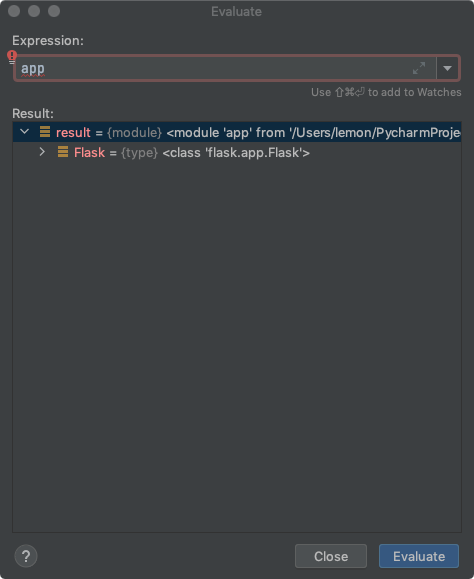
它只有Fask变量,是我们已经处理过from flask import Flask代码的结果。
这里的复现如果想清晰一点的话,可以把app.py前面改成这样
a=1
from flask import Flask
from blue import blue as bluePrint
app = Flask(__name__)config_service.py改成这样,并在这一行打断点,查看app里有a=1和Flask
import app本质
-
python把已经加载的模块放在一块区域中,每个文件import不会重新把这个文件读取一次,而是先从已经加载的模块中读取。
-
python没有读取完成的模块也会放在区域中,但是会标记为
partially initialized module,这样很大程度的解决了循环依赖的问题(可以对比参考spring的解决循环依赖的方式)。但是如果读取partially initialized module时没有找到所需要的属性会直接报错。python很懂你,他知道你既然引用了模块变量,说明这个模块大概率有这个变量。现在在初始化阶段,只加载了这个模块的前半部分内容,并没有你所需要的变量,那么它极有可能是在剩下未加载的内容中,这是一个显然的循环依赖错误,所以它会说。
(most likely due to a circular import) -
如果在A文件读取时调用了B,B初始化时调用了A中未加载的变量,就会出现循环依赖。
避免方式
如果在A文件读取时调用了B,B初始化时调用了A中未加载的变量,就会出现循环依赖。
- 我们把B需要的A中的变量在A调用B之前就声明/初始化,让B文件能在A已经加载的内容中正常读取需要的变量。
- 使用第三方文件。
注意
并不是在所有时候两次import都只会执行一次文件解释,这是Local命名空间+import机制的共同结果,以上描述没有提到全局命名空间的概念,不在这次主要的讨论中,大家可以自行搜索。
current_app和请求上下文分析
如以下代码:
from flask import current_app
#from app import app
current_app.config_map={}
之前遇到蓝图里app循环依赖的问题,网上的建议都是使用current_app代替app使用,这次我直接在初始化config_service时使用current_app,会提示:
working outside application context提示不在应用上下文中,那么为什么呢?上下文是什么?怎么实现的?
官方解释
上下文的作用
当
Flask应用处理请求时,它会根据从 WSGI 服务器收到的环境创建一个Request对象。因为 工作者 (取决于服务器的线程,进程或协程)一 次只能处理一个请求,所以在该请求期间请求数据可被认为是该工作者的全局数据。 Flask 对此使用术语 本地情境 。处理请求时, Flask 自动 推送 请求情境。在请求期间运行的视图函数,错误处 理器和其他函数将有权访问
request代理,该请求代理指向当前请求的请 求对象。英文原文:
The
Flaskapplication object has attributes, such asconfig, that are useful to access within views and CLI commands. However, importing theappinstance within the modules in your project is prone to circular import issues. When using the app factory pattern or writing reusable blueprints or extensions there won’t be anappinstance to import at all.Flask solves this issue with the application context. Rather than referring to an
appdirectly, you use thecurrent_appproxy, which points to the application handling the current activity.Flask automatically pushes an application context when handling a request. View functions, error handlers, and other functions that run during a request will have access to
current_app.Flask will also automatically push an app context when running CLI commands registered with
Flask.cliusing@app.cli.command().
上下文的生命周期
当 Flask 应用开始处理请求时,它会推送请求情境,这也会推送 应用情境 。当请求结束时,它会弹出请求情境,然后弹出应用程序情境。
情境对于每个线程(或其他工作者类型)是唯一的。
request不能传递给 另一个线程,另一个线程将拥有不同的情境堆栈,并且不会知道父线程指向的请求。本地情境在 Werkzeug 中实现。有关内部如何工作的更多信息,请参阅 Context Locals 。
英文
The application context is created and destroyed as necessary. When a Flask application begins handling a request, it pushes an application context and a request context. When the request ends it pops the request context then the application context. Typically, an application context will have the same lifetime as a request.
See The Request Context for more information about how the contexts work and the full life cycle of a request.
理解
一张非常好的图,描述了两个栈已经请求进来时的处理

-
一个请求进来时,会先判断是否
_app_ctx_stack中是否空,空的话会压入一个AppContext,之后会新建一个RequestContext对象压入_request_ctx_stack栈中。 -
request和current_app对象都是LocalProxy,request指向请求上下文栈的栈顶,current_app指向app上下文的栈顶。这时你可以使用这两个对象获取当前全局变量app信息,以及请求的相关信息,如(request.path,request.form)。这也是初始化时使用直接current_app导致“working outside application context”的直接原因。 -
在请求处理结束后,指针当前指向的元素会被弹出。
手动压入上下文
当我们需要初始化一些拓展或者配置时,我们需要app对象,但是又可能造成循环依赖,正确的办法是使用手动压入的app上下文。
#......
from flask import Flask, current_app

app = Flask(__name__)
db.init_app(app)

ctx = app.app_context() # 创建app上下文
ctx.push() # 上下文入栈
db.create_all() # db初始化需要app
ctx.pop() # 上下文出栈
在我们的demo项目中,可以这么操作
app.py前半部分
from flask import Flask

app = Flask(__name__)

ctx = app.app_context()
ctx.push()
from blue import blue as bluePrint # 在有上下文的情况下导入蓝图
app.register_blueprint(bluePrint, url_prefix='/blue') # 注册蓝图可以不在上下文中
ctx.pop()
config_service.py
from flask import current_app

current_app.config_map = {}  # 这里可以正常取到,因为我们压入了app上下文

def set_config(name, value):
    if name:
        current_app.config_map[name]=value  # 这里的上下文是处理请求的时候才会调用

def get_config(name):
    return current_app.config_map.get(name, "name不存在")  # 这里的上下文是处理请求的时候才会调用
这样我们可以正常启动应用,没有循环依赖,没有上下文错误,完美。
with app.app_context()
实际上我们可以使用with来代替手动出入栈的过程,管理我们初始化需要的上下文。
#......
from flask import Flask, current_app

app = Flask(__name__)
db.init_app(app)

with app.app_context():
    db.create_all()
总结
1)Local->LocalStack,线程隔离对象实现
Local内部有一个字典,以线程ID号作为key
LocalStack如何实现?LocalStack封装了Local
操作Local,通常使用.去访问下面的属性;使用LocalStack,需要 使用那几个常用的方法和属性,push、pop、top
(2)AppContext->RequestContext
请求进来,会被推入到LocalStack的栈中去,同时在请求结束时, AppContext和RequestContext会被pop弹出去
(3)Flask->AppContext Request->RequestContext
AppContext重要特点,将Flask核心对象作为它的一个属性,保 存了起来
RequestContext请求上下文,将请求对象Request封装和保存
(4)current_app->(LocalStack.top=Appcontext top.app=Flask)
current_app指向的是LocalStack下面的栈顶元素的一个属性, 也就是top.app,Flask的核心对象
栈顶元素为应用上下文
(5)request->(LocalStack.top=RequestContext top.request=Request)
request实际指向的是LocalStack栈顶元素下面的Request请求对象
参考
https://flask.palletsprojects.com/en/2.0.x/appcontext/
https://blog.csdn.net/weixin_30362801/article/details/98487941
flask框架中,使用 current_app 遇到了Working outside of application context, 如何解决?
本文给出了在蓝图中遇到此问题的解决方法。
注册蓝图的地方(一般为程序入口)使用:
with app.app_context():
app.register_blueprint(my_blueprint)
定义蓝图的地方使用
from flask import current_app
# 后面用 current_app 而不是 app